Dropping a Page on the Key
Private Passwords never reads your web pages and never types into them. Instead, you bring the page to Private Passwords, and it finds the logins for that site.
Bringing a page to the key
There are two ways:
- Drag the page's address onto the key. In your browser, drag the address from the address bar, or the small icon beside it, and drop it on the key in the menu bar. The key turns dark while the address is over it, so you know it's in the right place.
- Send it from Safari. Highlight the page's address, then press ++shift+command+k++. Or right-click the highlighted address and choose Services, then Send to Private Passwords.
What opens
Private Passwords looks for the logins of that site, by their Website and their
Other Websites. It matches the whole site, so a login saved for
example.com is found on login.example.com too.
- One login? It opens straight away, ready to drag into the page.
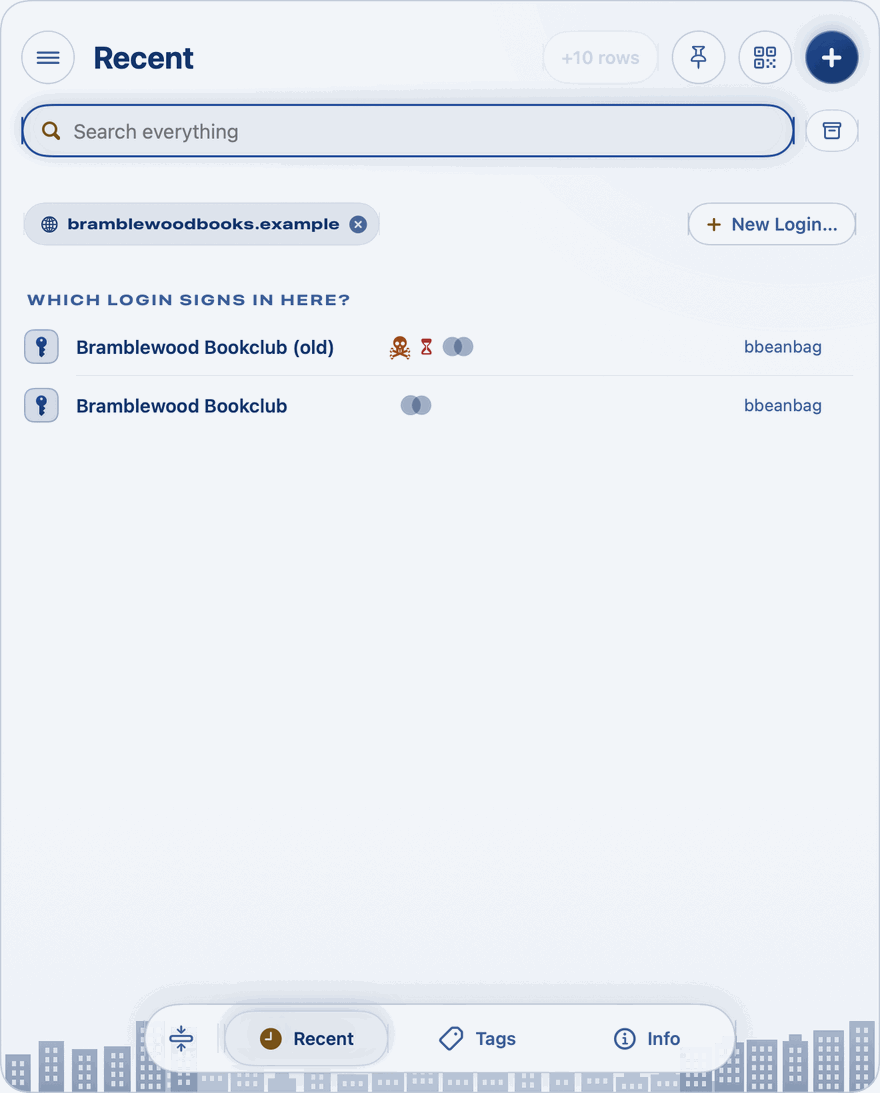
- Several? The panel lists them under Which login signs in here? Click the one you want, and it opens beside the panel.
When the login's Website is a different page of the same site, the login offers Make this page its address. Click it, and the page you dropped becomes the login's Website. Where the login already holds another page, Private Passwords shows it and asks first: Keep It or Replace. - None? The panel says Nothing is recorded for the site, and offers New Login… to make one for it.
Then drag the username and password into the page. See Dragging a Value into a Form.
When the login is kept under another address
To look for a login under a different address, click the × on the site's label. The panel goes back to Recent, as the key opens it. A login you open from there is still opened for the page, and offers Add this page to its Other Websites, so it's found here next time.
The send shortcut
The ++shift+command+k++ shortcut is kept by your Mac, with those of every other service. To change it, or to turn the service on where it isn't offered, open Private Passwords' Settings and click Open Keyboard settings. Your Mac's Keyboard Shortcuts open at Services.
More than one screen?
The key is in the menu bar of every screen. Drop the address on the key of the screen you're working on.