Copying and the Clipboard
When you copy a password from Private Passwords, it doesn't stay on your clipboard for ever. After a short while, Private Passwords clears it, so it isn't left for another app to find.
How long a copy stays
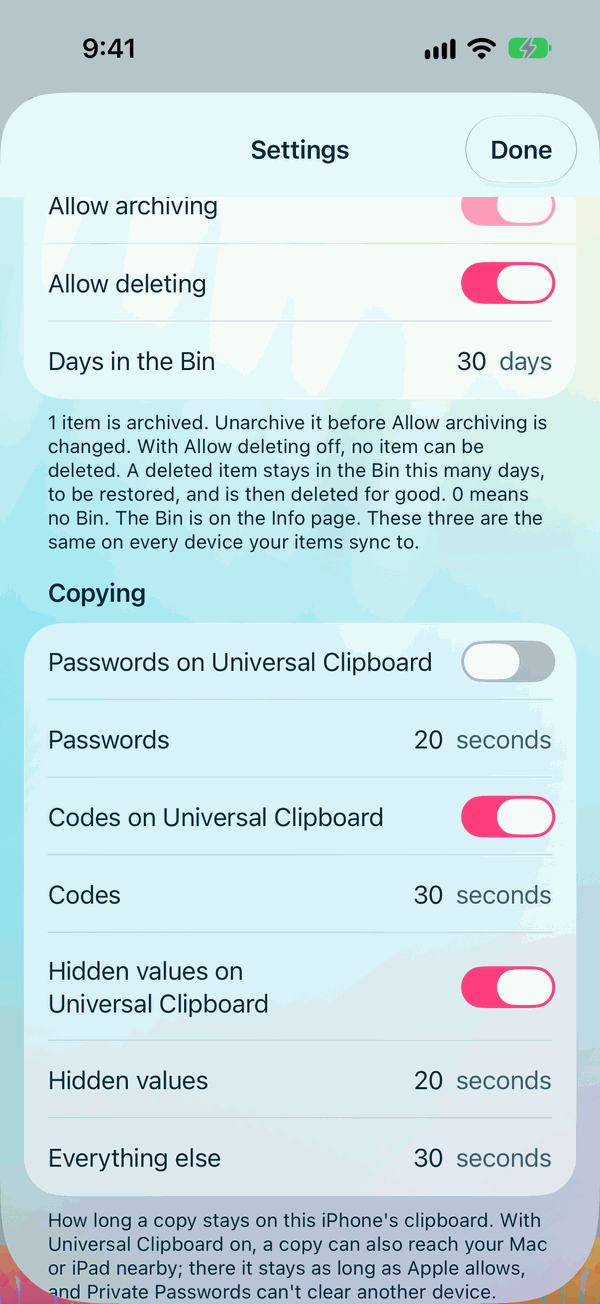
In Settings, under Copying:
| What you copy | Stays for, to begin with | You can choose |
|---|---|---|
| Passwords | 20 seconds | 10 to 120 seconds |
| One-time codes | 30 seconds | 10 to 120 seconds |
| Hidden values, such as a card number | 20 seconds | 10 to 120 seconds |
| Everything else, such as a username | 30 seconds | 10 to 300 seconds |
Universal Clipboard
With Universal Clipboard, something you copy on your iPhone can be pasted on your Mac or iPad nearby. Beside each of passwords, codes and hidden values is a switch for whether it may travel:
- Passwords: off to begin with. A copied password stays on this iPhone.
- Codes and Hidden values: on to begin with, as you often read a code on your iPhone to type on your Mac.
Everything else always stays on this iPhone.
Note
Once a copy reaches another device, it stays there as long as Apple allows. Private Passwords can only clear its own device's clipboard.