Private Passwords on iPhone Duo
The iPhone Duo is Apple's folding iPhone. Closed, it's a phone with a screen on its cover. Open, it's a big screen, wider than it is tall. You can also turn it either way up, stand it like a tent, or leave it half open. Private Passwords has a layout made for each of them.
Only the arrangement changes. Your items, Face ID or Touch ID, your tags, backups and settings all work exactly as the rest of this help describes.
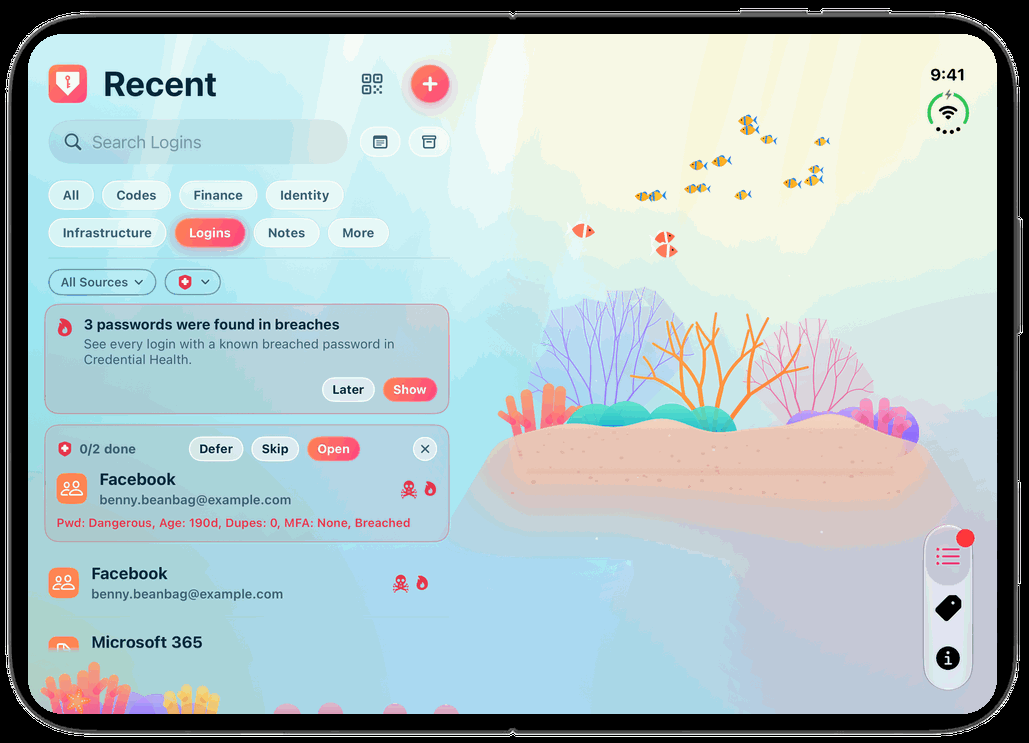
Every way you hold it
| How you hold it | What you see | Read more |
|---|---|---|
| Closed, upright | The cover: one page at a time, as on any iPhone, with the tabs in a strip down the right-hand edge | Closed: the Cover |
| Closed, sideways, or standing as a tent | One page at a time across the cover, with the tabs in the camera's strip | Sideways, or standing as a tent |
| Open, the way it opens | Two halves: your list on the left; on the right the item you opened, or your theme's picture | Open: Two Halves |
| Open, turned upright | The same two halves, with the tabs in a bar across the bottom | Held upright |
| Half open | The same two halves, with the fold between them | Half open |
| Open, beside another app | Half the screen, laid out as on an ordinary iPhone | Beside another app |
The strip down the side
On the iPhone Duo, iOS moves the clock, Wi-Fi and battery into a strip down the right-hand edge of the screen. Private Passwords puts its tabs there too, as three symbols at its foot: Recent, Tags and Info. Tap one to switch, just as you'd tap a tab at the bottom of an ordinary iPhone. Turned upright, the open Duo has its tabs in a bar across the bottom instead.
Opening and closing
You can open or close the Duo at any time, and Private Passwords carries on:
- Open it while a screen is open on the cover, such as New Item or Manage Tags, and that screen moves into the right half, keeping what you had typed. An item showing its password closes instead, as showing it again would mean asking for Face ID or Touch ID: tap it again to see it.
- Close it, and whatever was open in the right half closes. The cover shows the page you were on.
Turning the Duo, open or closed, never closes anything: a code keeps counting down and a form keeps what you typed.